 limak

ZTA Zoom to Beat
Short zoom punches on the beat – every beat, every 2nd, every bar, every 8th or 16th beat. You choose how hard it punches.
Motion-based effect plugins for DaVinci Resolve
Zoom to Audio listens to the song under your clip and moves the picture with it. One click on Analyze Audio – no keyframes, no code.
In one picture
Think of a camera operator who listens to the music and pushes in a little on every beat. Through a calm part, a slow zoom in. On the big drop, the picture jumps. That's Zoom to Audio – just automatic.
Inside Resolve
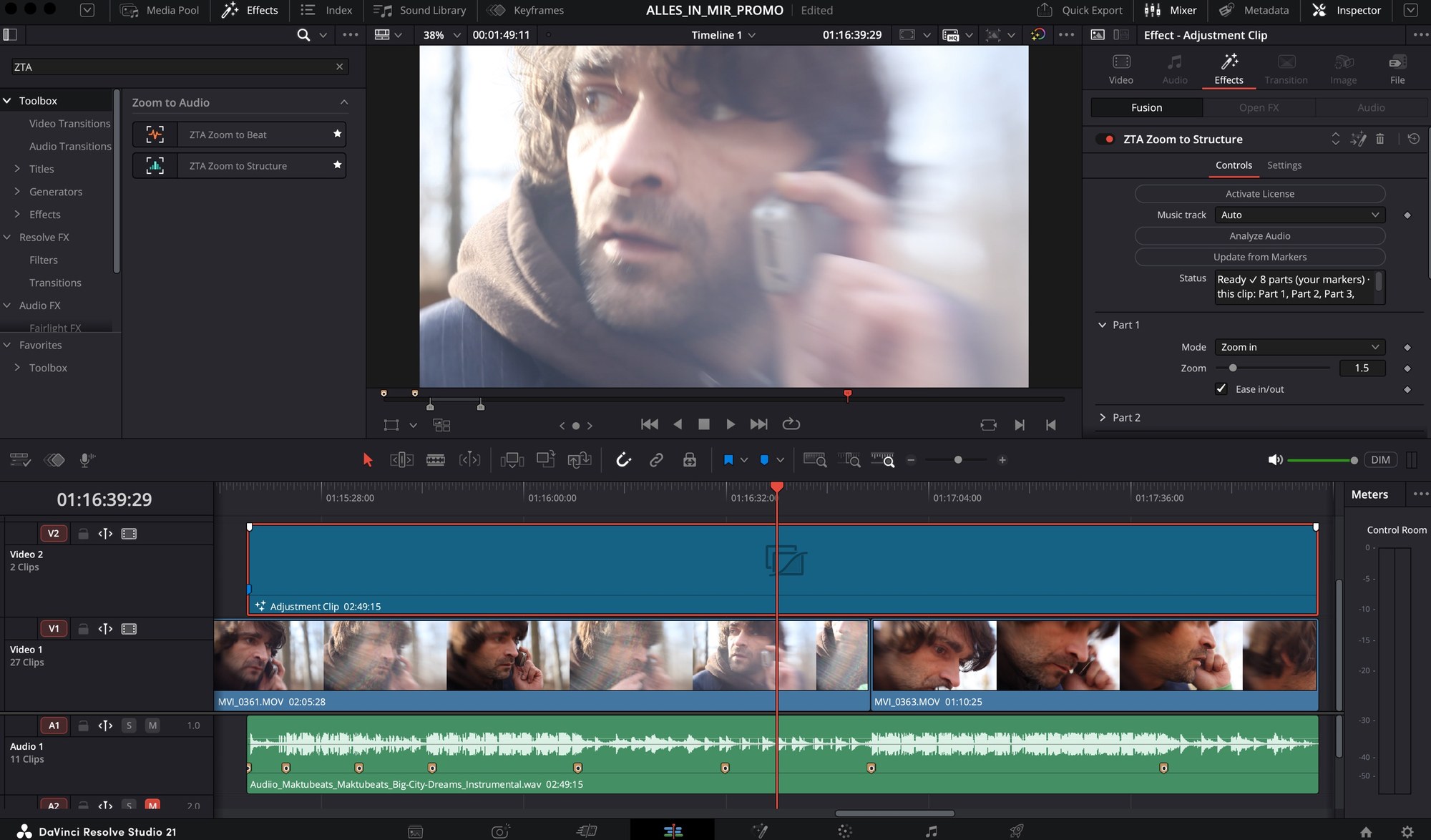
Both effects in the Effects panel, Zoom to Structure in the Inspector – and a marker on the music clip for every part of the song.
Available now
Two Fusion effects for the Edit page. Drop one on a clip or on an Adjustment Clip – the zoom follows the music on your timeline.
Short zoom punches on the beat – every beat, every 2nd, every bar, every 8th or 16th beat. You choose how hard it punches.

Finds the parts of the song – intro, build-up, drop, breakdown – and moves the zoom from part to part. It sets a marker on the music clip at every part: move a marker, click Update from Markers, and the zoom follows. Hover over a marker to see the part's setting.
Structure on the clip for the big moves, Beat on an Adjustment Clip above it for the punches.
Auto-edit your footage based on audio.
Builds a cut of your footage to the music: for every part of the song it picks clips from your bins based on motion and tempo.
How it works
Pay once on DaVinci Market. You get Zoom to Audio.drfx and your license key in your library there.
Double-click the .drfx file and restart Resolve. The pack appears in Effects › Effects › Zoom to Audio.
Drag an effect onto a clip, click Activate License once and restart Resolve, then Analyze Audio. Done.
FAQ
No. The free version does not allow effects to analyze audio, so Zoom to Audio needs DaVinci Resolve Studio.
Zoom to Audio uses Python 3 and the free audio library librosa. If librosa is missing, it asks once and installs it for you (about 1–2 minutes). On Windows it can also install Python for you.
You get a license key with your purchase (in your DaVinci Market library). Paste it once via Activate License (internet needed only for that). One license works on 2 computers – for example your office machine and your laptop. Until activated, the picture shows an UNLICENSED watermark. After activating, restart Resolve once – then the watermark is gone.
Yes. BPM, zoom amount, timing and every song part can be set by hand in the Inspector. With Zoom to Structure you can move the markers and click Update from Markers.
Newsletter
One email when a new pack comes out. No spam. You confirm your address first, and you can unsubscribe with one click.